Instant download · works offline · no account, no subscription All templates

For UK offices, workshops, surgeries & small sites

7 reasons to retire the paper visitor book

The fire alarm goes off and nobody knows which contractors are still in the building, because the visitor book is a page of scribbles. Visitor Sign In turns a spare laptop or Android tablet at reception into a sign-in kiosk: visitors sign themselves in and out, you can print a fire roll call of everyone on site in one click, and a dashboard shows who visits and when.

  • Works offline, one HTML file
  • Desktop browser & Android
  • Demo data to try first
  • No account, no subscription
Visitor Sign In App: annotated screen from the demo data

Screens from the app's built-in demo data. All names and figures are fictional.

1HTML file, works offline
1tap fire roll call
0accounts, installs or subscriptions

The list

Why a ready-made app beats paper and a blank spreadsheet

01

Sign-in kiosk

Big Sign in and Sign out buttons, your site name and a privacy notice
Visitor Sign In App: annotated screen 1 from the demo data
02

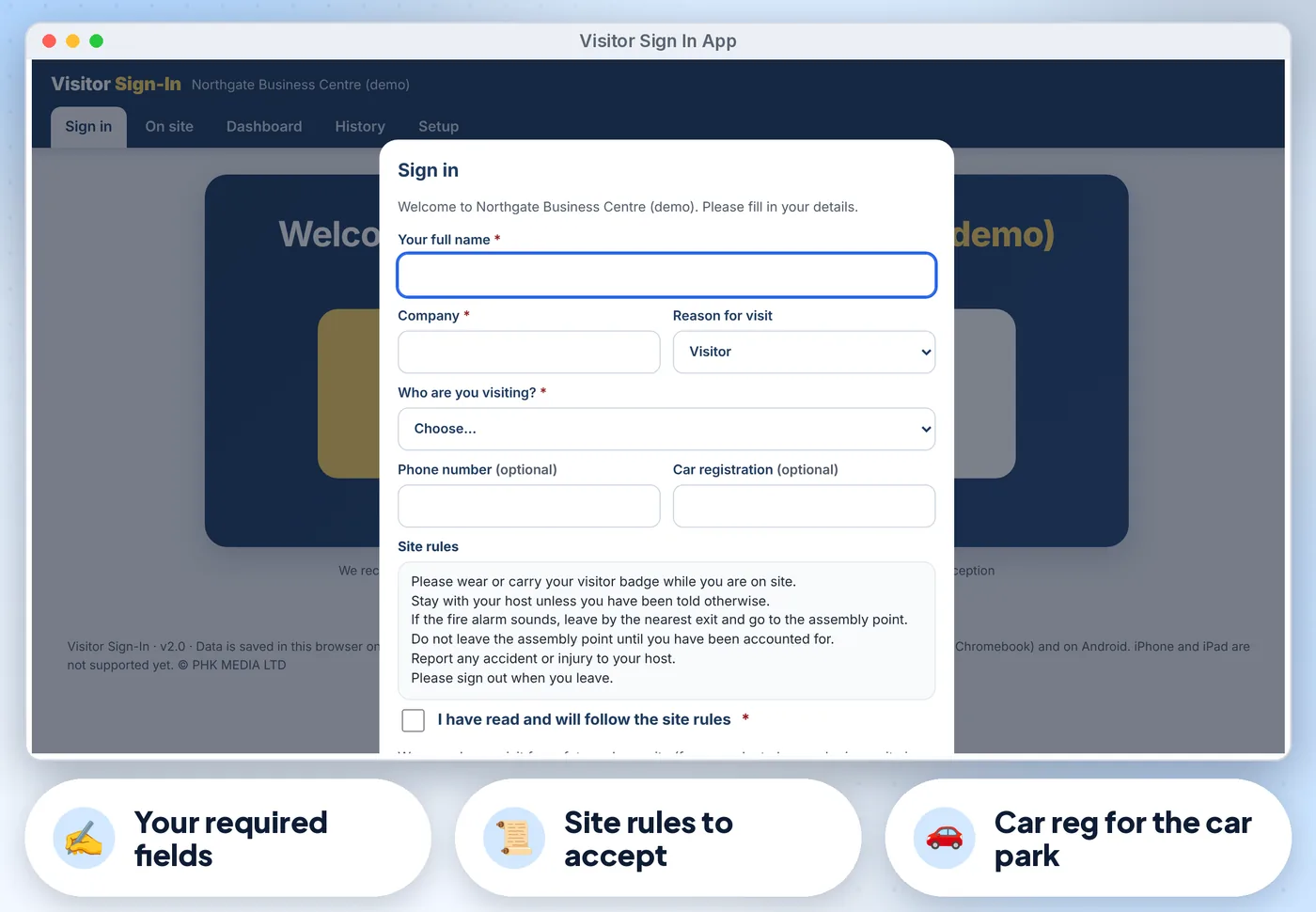
Visitors enter their name, company, who they are visiting

(pick from your list), reason for visit, phone and car registration. You choose which details are required
Visitor Sign In App: annotated screen 2 from the demo data
Get the app · £16.99 Instant download · works offline
03

Your site rules shown at sign-in, with a tick box visitors must confirm

(optional)

Visitor Sign In App: annotated screen 3 from the demo data
04

Sign out

Visitors type part of their name and tap it. Nobody else sees the full list

05

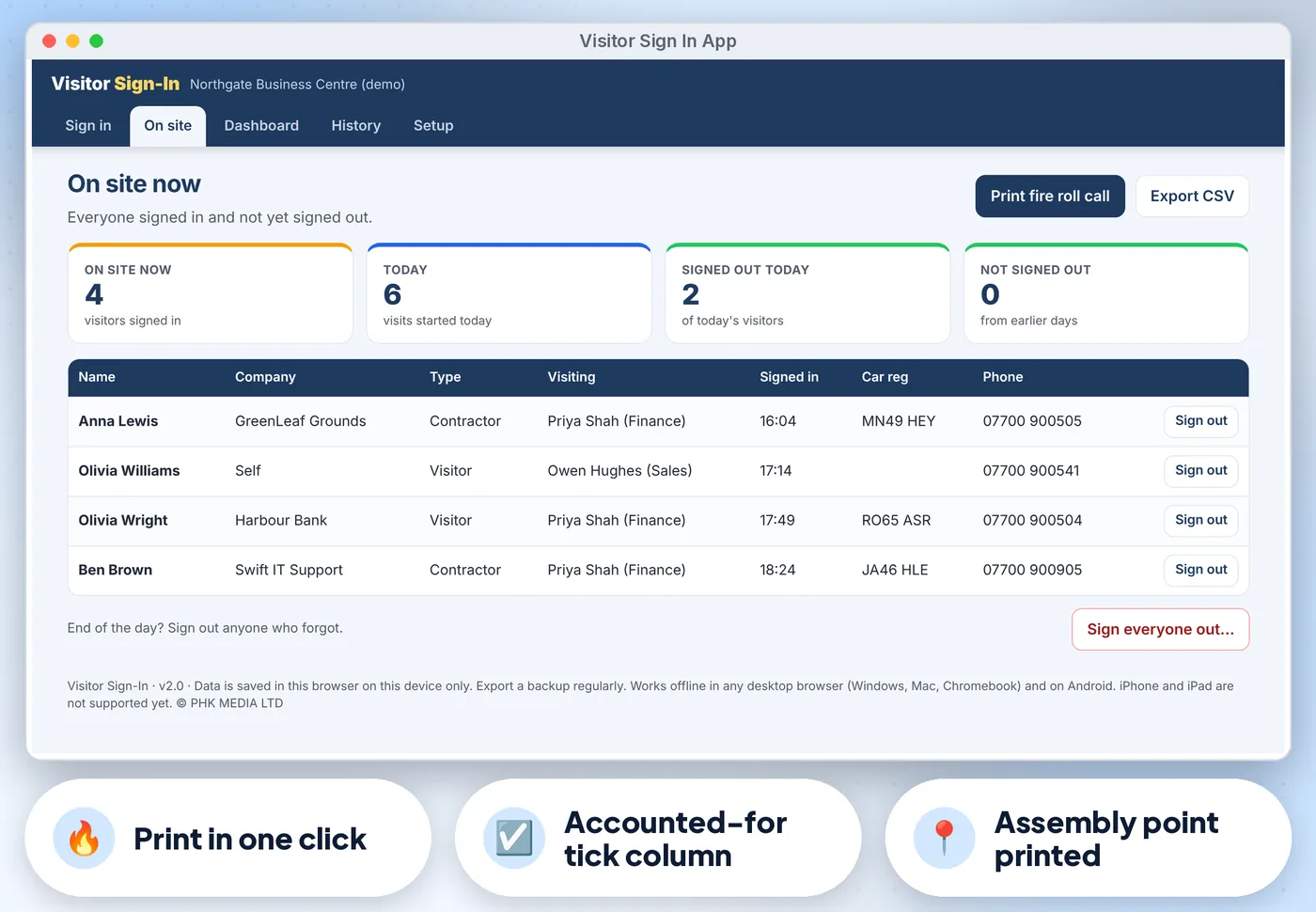
On site now

Everyone still signed in, with Sign out buttons and Sign everyone out at the end of the day

06

Fire roll call

Print everyone on site with company, host, time in, car reg and phone, the assembly point and an Accounted-for tick column

07

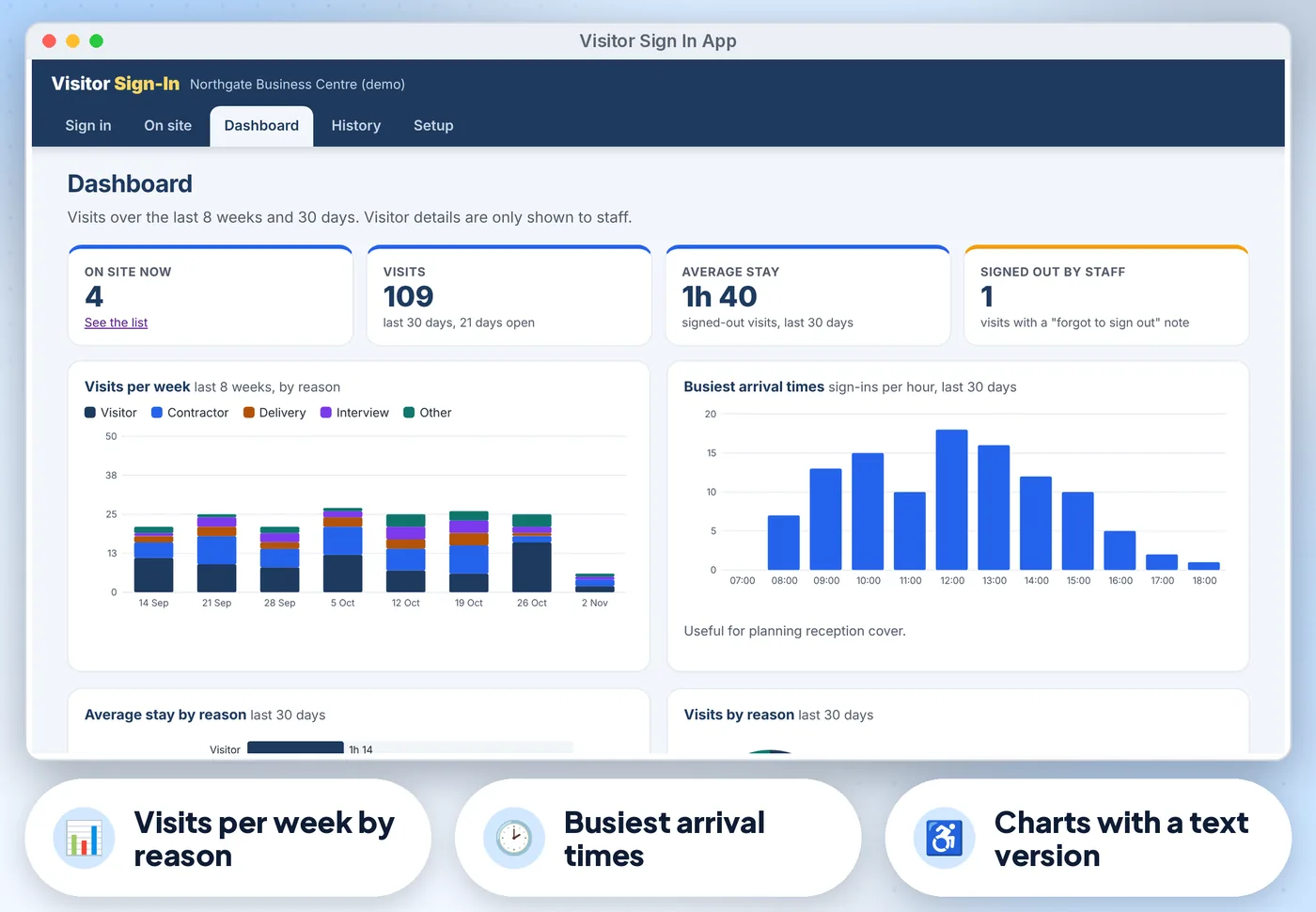
Dashboard with on site now

Visits in the last 30 days, average stay and visitors signed out by staff, plus charts of visits per week by reason, busiest arrival times, average stay by reason and visits by reason. Every chart has a text version for screen readers

Get the app · £16.99 Instant download · stuck? Email us for help

Compare

Three ways to keep these records

FeaturePaper formsA spreadsheetThis app
Sign-in kiosk✗No~ If you build it✓ Built in
Visitors enter their name, company, who they are visiting✗No~ If you build it✓ Built in
Sign out✗No~ If you build it✓ Built in
On site now✗No~ If you build it✓ Built in
Fire roll call✗No~ If you build it✓ Built in
CostFree, plus your timeFree, plus your time£16.99 once

What's inside

Everything you download

2 files

  • HTML Visitor-Sign-In.htmlthe app. One file, opens in your web browser, works offline
  • PDF Start-here.pdfquick-start guide with the 3-step plan, privacy and backup tips
  • + Demo data built in (a business centre with 8 weeks of visits), so you can try everything first

Also included

  • Full keyboard use, screen-reader labels, a skip link and high-contrast colours (tested against WCAG 2.2 AA with axe)
  • History: search by name or company, filter by dates and reason, edit or delete any visit, CSV export for Excel or…
  • Privacy: optional staff PIN so visitors only see the sign-in screen, and automatic deletion of old visits after the…
  • JSON backup and restore, and a demo reception to practise with

Good to know

  • Visits are saved in the browser on the reception device only. Download a backup (JSON) regularly and use it to move to another device
  • Visitor details are personal data. Edit the privacy notice to say why you collect them and how long you keep them, and set the auto-delete days to match
  • The roll call lists visitors signed in with this app, not your own staff. Use it alongside your fire procedure
  • The PIN stops casual browsing at reception; it is not strong security, because data is stored unencrypted in the browser
Visitor Sign In App: another screen from the demo data
Visitor Sign In App Screens from the app's built-in demo data. All names and figures are fictional.

Is it right for you?

Made for some, honestly not for others

A good fit if you…

  • UK offices, workshops, schools' site offices, surgeries, small factories, charities and co-working spaces with one reception
  • want something that works offline, on a desktop browser or Android
  • want to pay once, not another subscription

Not for you if you…

  • you need badge printing
  • email or text alerts to hosts
  • several devices sharing one list
  • an app on iPhone or iPad

How it works

Three steps, about 5 minutes to set up

  1. 1

    Open the app and try the demo

    Press Use my data. In Setup enter your site name, assembly point and the people visitors come to see, choose the required details, check the site rules and privacy notice, and set a staff PIN (about 5 minutes).

  2. 2

    Leave the laptop or tablet at reception on the Sign in screen.…

  3. 3

    Staff use On site now and the fire roll call during the day

    And History and the Dashboard to look back.

Desktop browserTested in Google Chrome on a desktop (1440 px wide) and on Android phone sizes (390 px and 360 px wide). Also runs in current Edge and Firefox, and Safari on Mac
Android phone or tabletWorks offline once the file is saved on the device
0
No account, no subscriptionno installation, no account, no subscription, nothing is sent over the internet. Not iPhone or iPad yet: Safari on iOS cannot keep the app data from a downloaded file reliably, so we do not support it
Visitor Sign In App preview
  • Instant download
  • Demo data built in
  • Start-here guide

The offer

Visitor Sign In App

£16.99one-off · no subscription

  • The app. One file, opens in your web browser, works offline (Visitor-Sign-In.html)
  • Quick-start guide with the 3-step plan, privacy and backup tips (Start-here.pdf)
  • Licensed for use within one business or household
Buy now · £16.99

Price includes VAT where applicable — calculated at checkout. Secure checkout by Payhip.

14-day money-back guaranteeIf the template doesn't work for you, email info@phkmedia.co.uk within 14 days of purchase and we'll refund you in full — no hoops.

Questions? Email info@phkmedia.co.uk Stuck after you buy? We'll help you set it up.

Digital download, nothing is posted. Visitor Sign In is a record-keeping aid. Terms & licence.

14-day money-back guarantee

If the template doesn't work for you, email info@phkmedia.co.uk within 14 days of purchase and we'll refund you in full — no hoops.

Full policy in our Terms.

FAQ

Questions people ask

Can two tablets share one visitor list?

No. Each device keeps its own list. Use one device at reception.

Does it print visitor badges or email the host?

No. It records sign-ins and prints the roll call. Reception tells the host.

Is it GDPR compliant?

The app keeps data only on your device and can delete old visits automatically, but compliance depends on how you use it. Write your own privacy notice; the ICO website has guidance.

What if it doesn't work for me?

You're covered by our 14-day money-back guarantee. If the template doesn't work for you, email info@phkmedia.co.uk within 14 days of purchase and we'll refund you in full — no hoops.

What happens after I pay?

This is a digital product. Nothing physical will be shipped. Your download link appears straight after checkout and is also emailed to you.

Can I get help if I'm stuck?

Yes. Message us at info@phkmedia.co.uk and we'll help you set it up.

Stop doing it the hard way. Get the Visitor Sign In App.

Get the app · £16.99